
Working with Earn Rule Group Combinations
Overview
When configuring Earn Rules, the platform allows you to define the logic (or "strategy") to apply when multiple Earn Rules within an Earn Rule Group execute. In addition, the platform also lets you define the logic to apply when Earn Rules across multiple Earn Rule Groups execute.
If you have applicable Earn Rules in more than one Earn Rule Group, by default the platform selects the "best result" from among the results from each Earn Rule Group. This "best result" is used as the final Metric adjustment.
Note: If you need to use logic other than "best result" when comparing across Earn Rule Groups, you must define a Rule Combination. See Earn Rule Group Combination Strategies below for more information. If "best result" is your desired strategy, then you do not need to define a Rule Combination, as the platform will use "best result" by default.
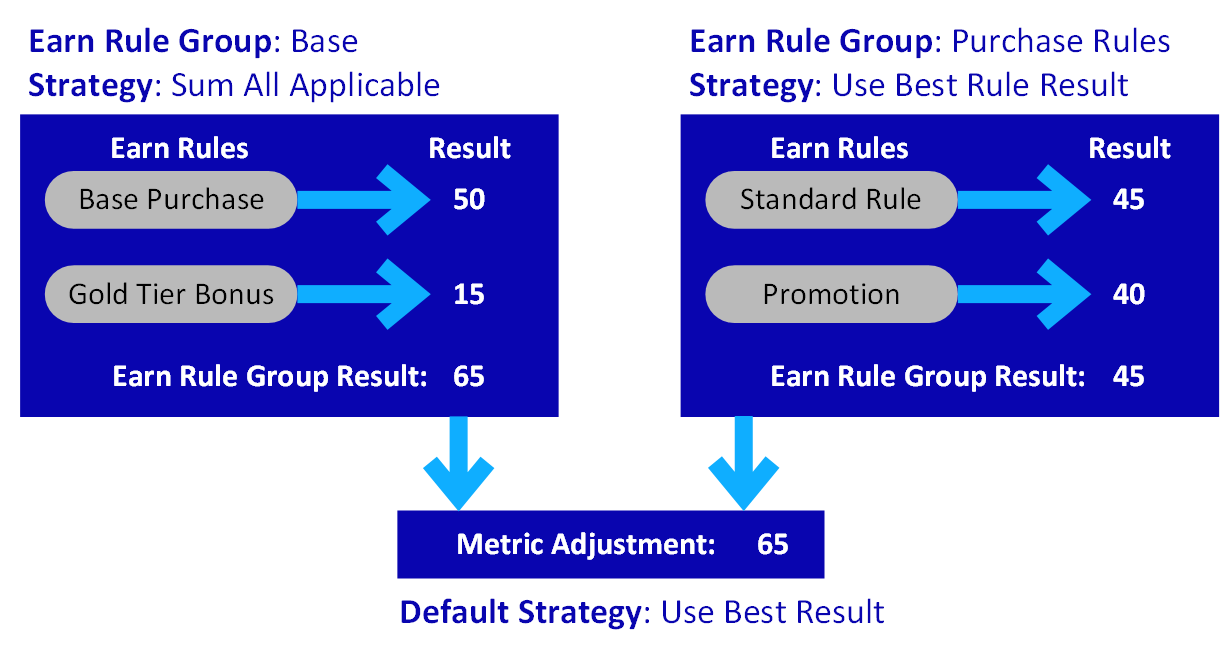
For example, the following diagram depicts a scenario with two Earn Rule Groups. The Base Earn Rule Group uses a "Sum All Applicable Rules" strategy, and the Purchase Rules Earn Rule Group uses a "Use Best Rule Result" strategy. The platform evaluates each Earn Rule Group independently to arrive at their results. The platform then selects the highest value between the two Earn Rule Groups; that highest value represents the Metric adjustment that gets applied.
In the below example, the Member has made a purchase, and the platform has calculated the result from the Base Earn Rule Group to be 65 Points (that is, 50 + 15). Likewise, the platform has calculated the result from the Purchase Rules Earn Rule Group to be 45 Points (that is, the best result between 45 and 40). Therefore, the platform will apply the "best" result across both Earn Rule Groups, which in this scenario is 65 Points (the best result between 65 and 45).
Earn Rule Group Combination Strategies
If you need to apply a different logic other than "best result," you must create an Earn Rule Group Combination, and select the desired strategy. The platform supports two different strategies of Earn Rule Group Combinations. Both of these strategies are described below.
Sum Results
The platform allows you to select multiple Earn Rule Groups, and sum their results together to arrive at the final result to be applied as the final Metric adjustment.
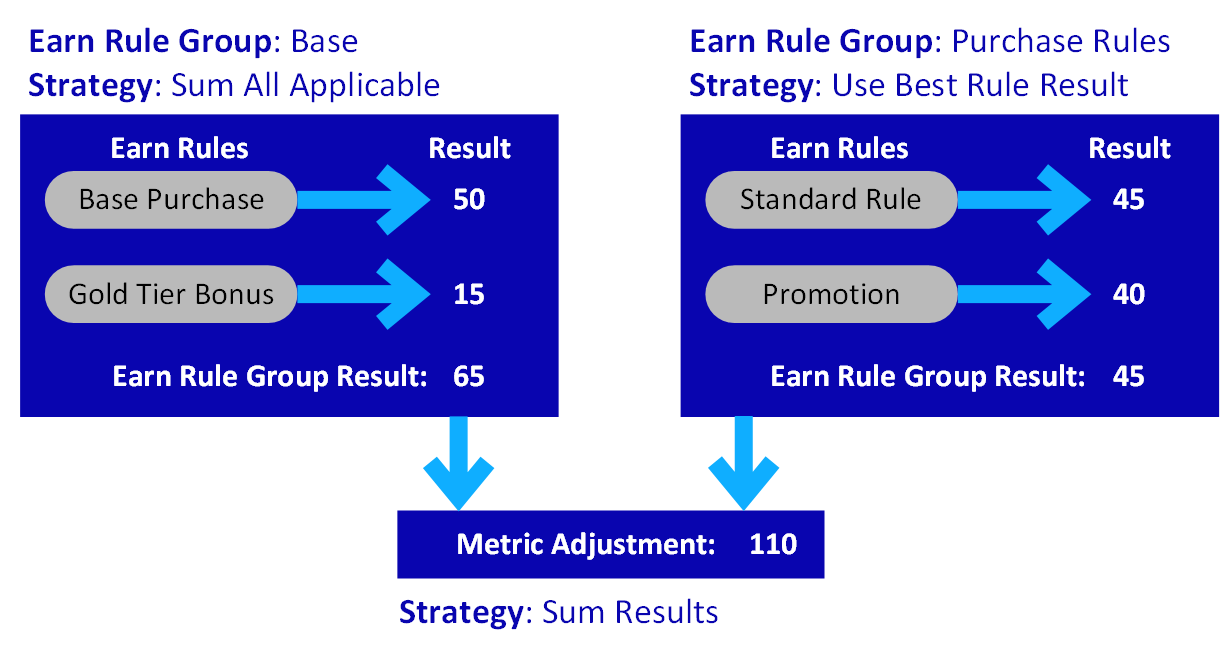
For example, the following diagram depicts a scenario with two Earn Rule Groups. The Base Earn Rule Group uses a "Sum All Applicable Rules" strategy, and the Purchase Rules Earn Rule Group uses a "Use Best Rule Result" strategy. The platform evaluates each Earn Rule Group independently to arrive at their results. The platform then adds these two values together to arrive at the final Metric adjustment.
In the below example, the Member has made a purchase, and the platform has calculated the result from the Base Earn Rule Group to be 65 Points (that is, 50 + 15). Likewise, the platform has calculated the result from the Purchase Rules Earn Rule Group to be 45 Points (that is, the best result between 45 and 40). Using the Sum Results combination strategy, the platform will then add together the results from both Earn Rule Groups, which in this scenario is 110 Points (that is, 65 + 45).
Expression
The platform allows you to enter a Groovy expression to calculate the Metric result to apply to a Member.
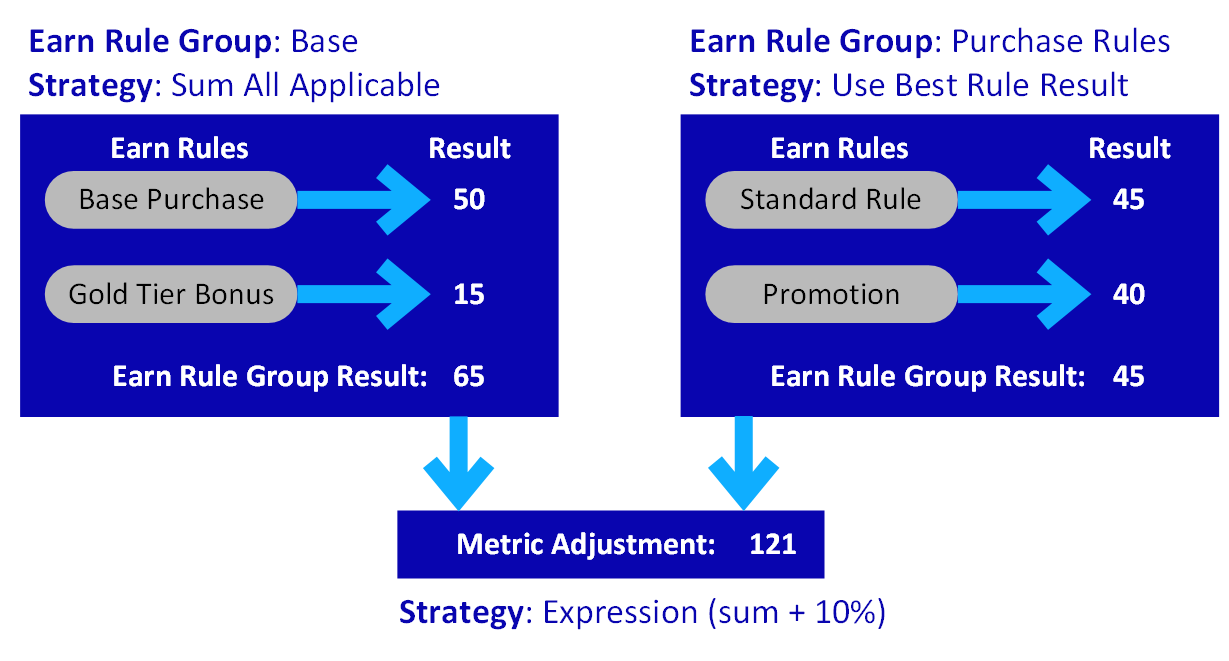
For example, the following diagram depicts a scenario with two Earn Rule Groups. The Base Earn Rule Group uses a "Sum All Applicable Rules" strategy, and the Purchase Rules Earn Rule Group uses a "Use Best Rule Result" strategy. The platform evaluates each Earn Rule Group independently to arrive at their results. The platform then executes a Groovy expression to calculate the final Metric adjustment.
In the below example, the Member has made a purchase, and the platform has calculated the result from the Base Earn Rule Group to be 65 Points (that is, 50 + 15). Likewise, the platform has calculated the result from the Purchase Rules Earn Rule Group to be 45 Points (that is, the best result between 45 and 40). Using the Expression strategy, the platform will then execute a custom Groovy expression to calculate the final result. In this example, the user has entered an Expression that sums together the results from all Earn Rule Groups, then adds an additional 10% because of a special promotion.
The result from this example purchase is the sum of the two Earn Rule Groups (that is, 65 + 45 = 110), plus an additional ten percent (10% of 110 = 11), with a final result of 121 (110 + 11).
Quick Links
 Create an Earn Rule Group Combination Create an Earn Rule Group Combination |
 Delete an Earn Rule Group Combination Delete an Earn Rule Group Combination |
 Edit an Earn Rule Group Combination Edit an Earn Rule Group Combination |
